EarnUSD

FAQ

Catalog

NOWPayments Tutorial

Before you start:

  • Please download the Bitfinex mobile app and complete login.
  • Ensure your Spot wallet has sufficient USDT.
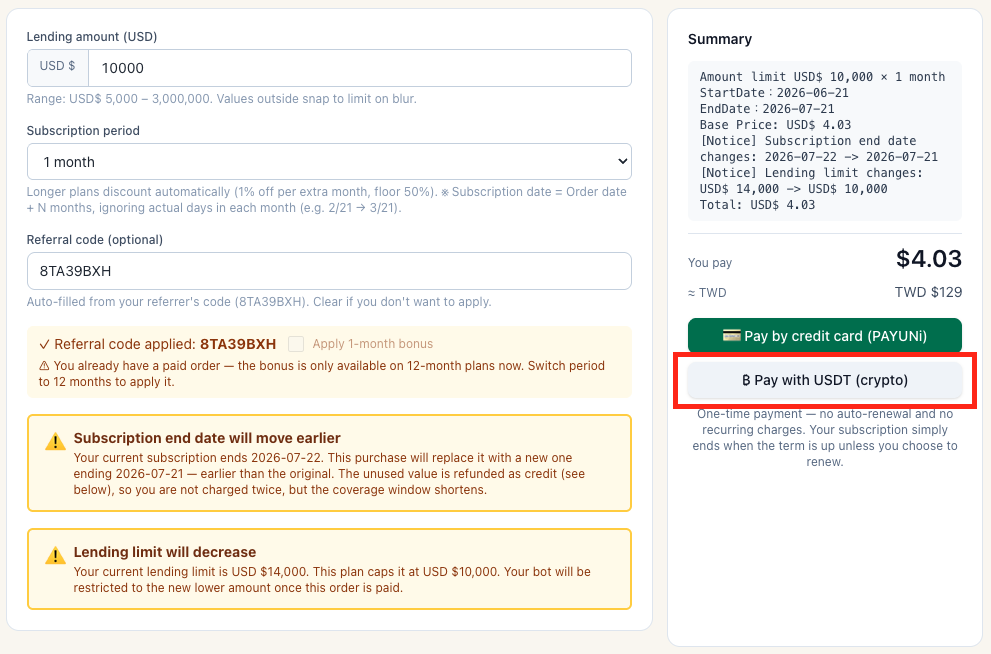
Step 1: Click Use NOWPayments
NOWPayments step 1
Step 2: Confirm the amount

Confirm the payment amount and enter your email.
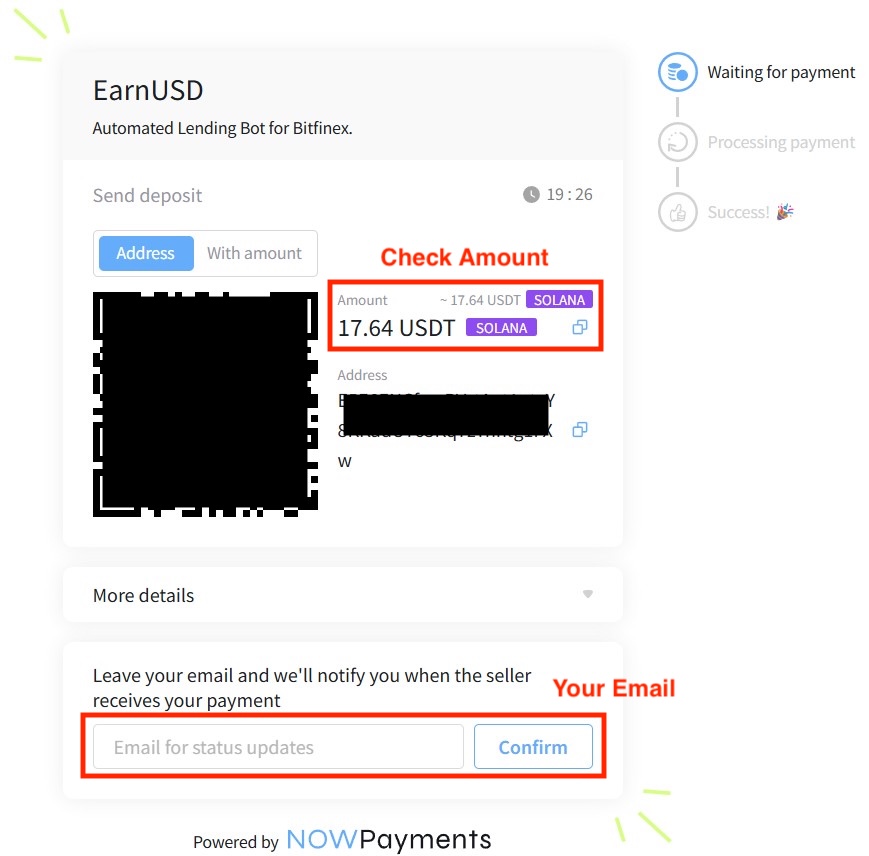
NOWPayments step 2
Step 3: Open the Bitfinex app

Tap Pay and use the top-right QR scanner to pay.
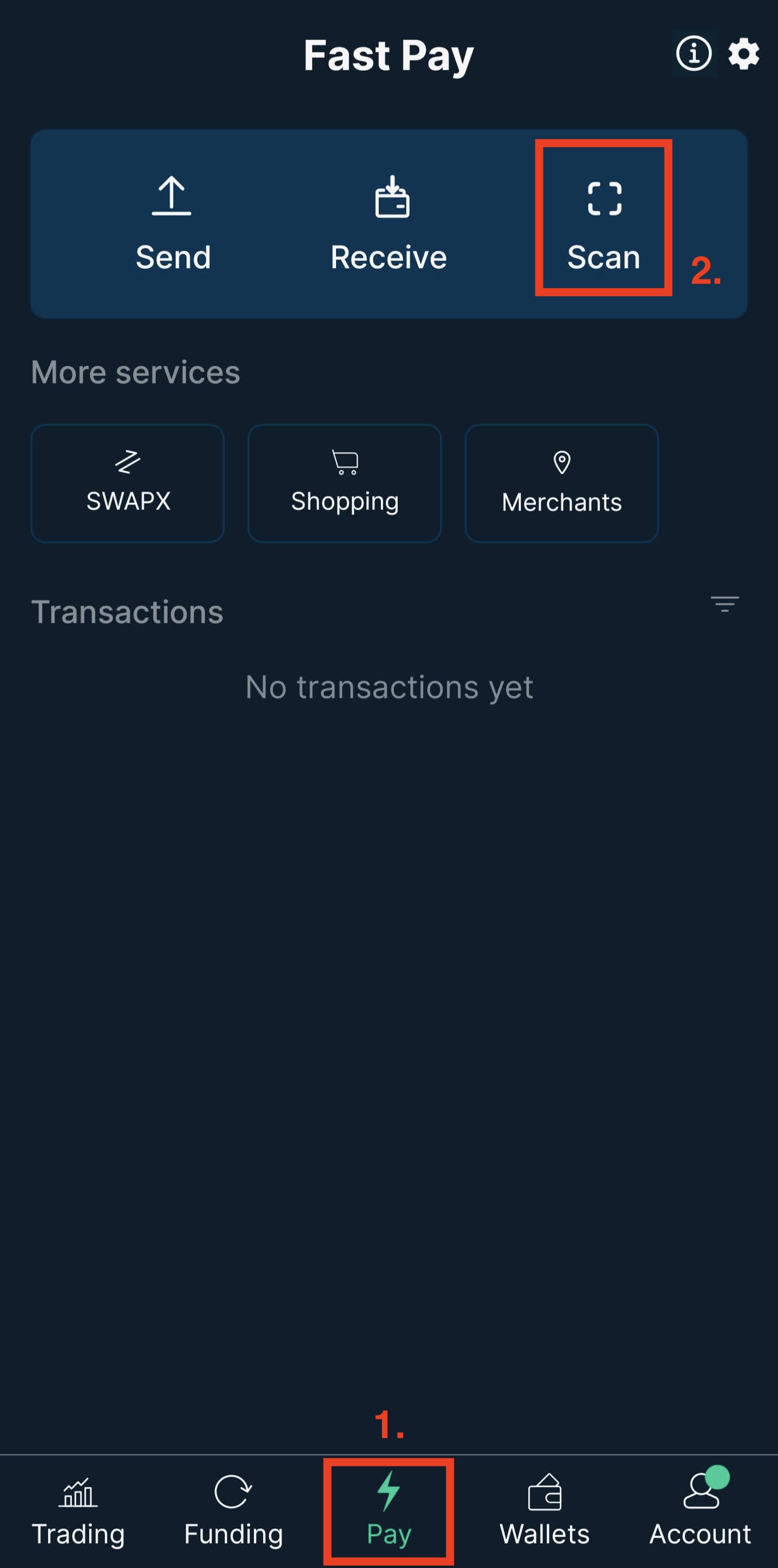
NOWPayments step 3

↑ Back to catalog

Convert USDT to USD on Bitfinex

Bitfinex has three wallet types: Spot Wallet, Margin Wallet, and Funding Wallet. The Spot Wallet is used for trading USD/USDT/cryptocurrencies, while the Funding Wallet is used for lending. To become a lender, place USD in the Funding Wallet. No fees apply for transfers between your own wallets.

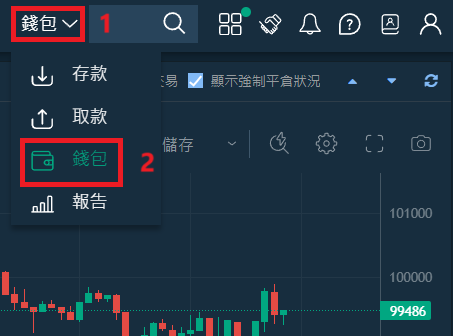
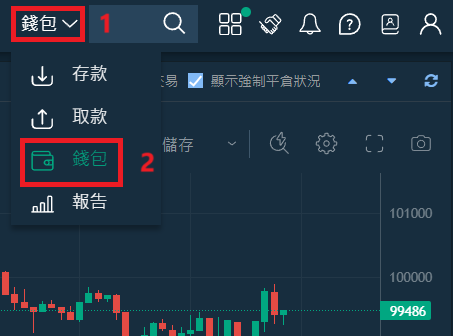
Step 1: Click Wallet in the top right corner
Convert step 1
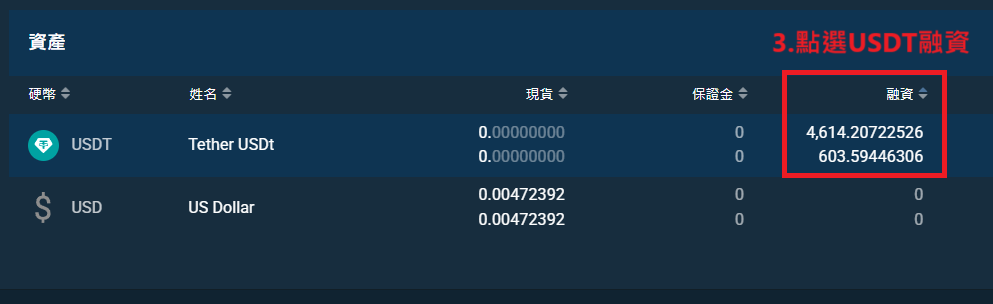
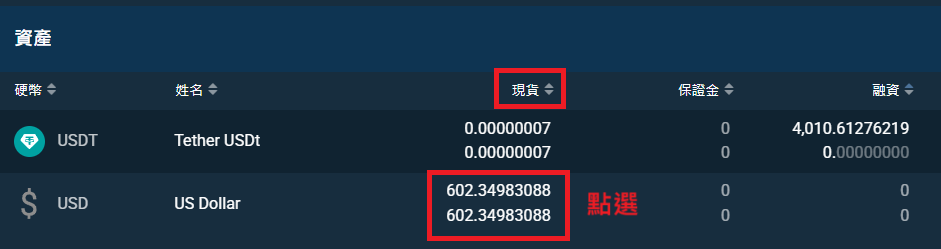
Step 2: Click on USDT Assets
Convert step 2
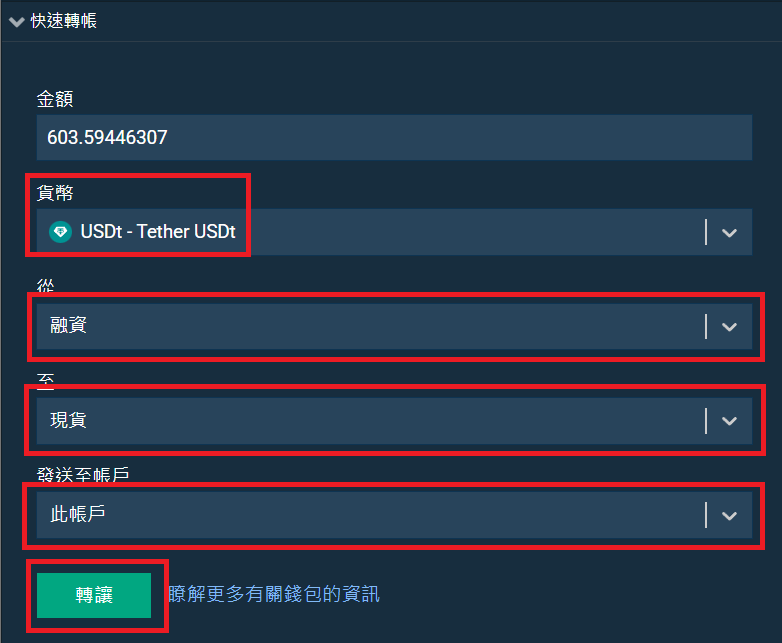
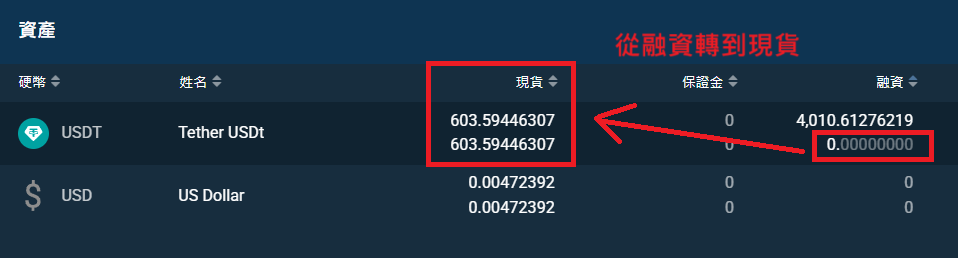
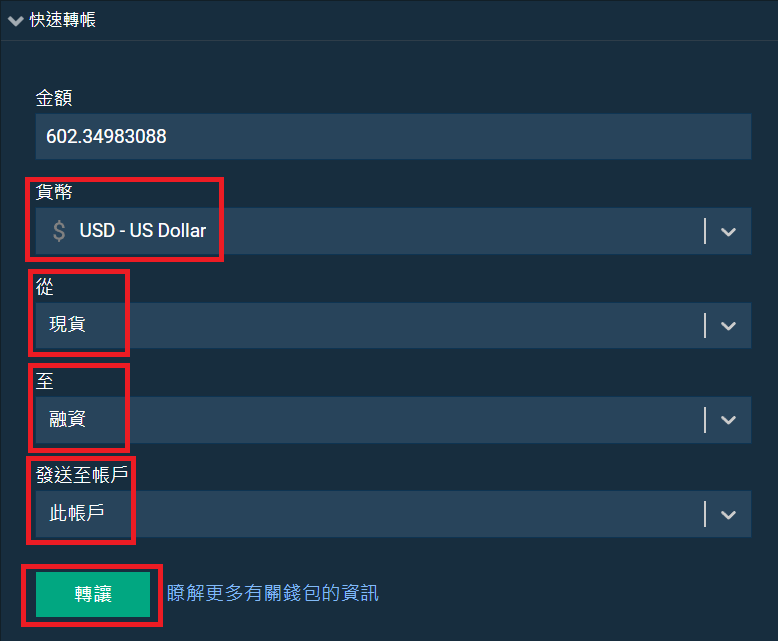
Step 3: Select Quick Transfer, from Funding to Spot
Convert step 3
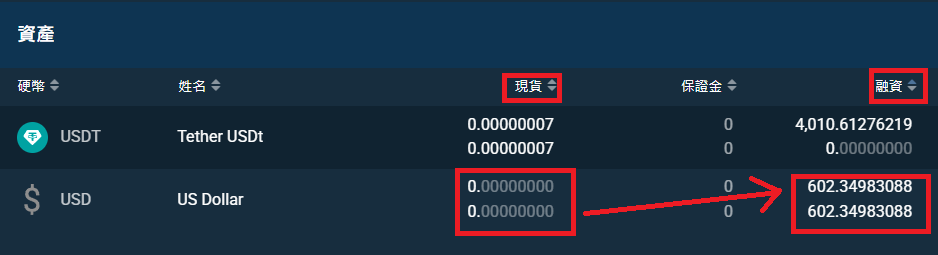
Step 4: Confirm the transfer
Convert step 4
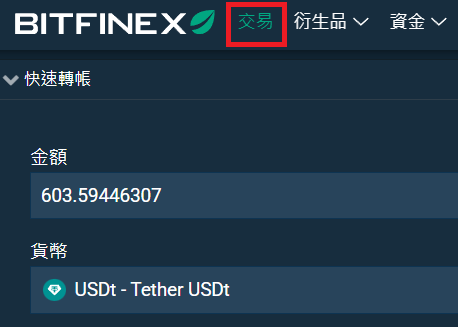
Step 5: Click Trading in the top left corner
Convert step 5
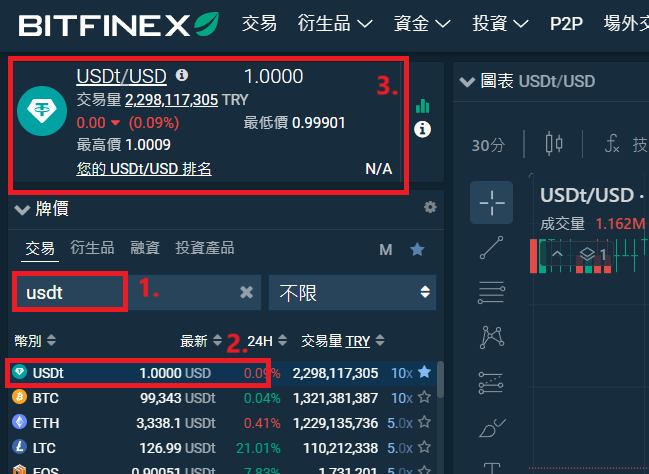
Step 6: Enter USDT and click
Convert step 6
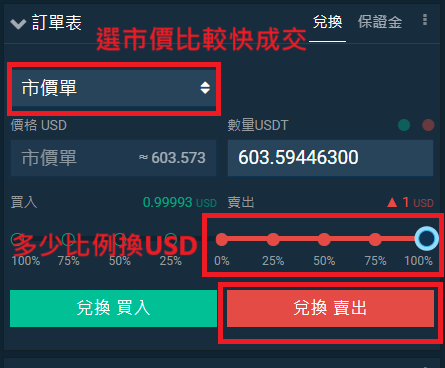
Step 7: Select market price and conversion amount
Convert step 7
Step 8: Click Wallet in the top right corner
Convert step 8
Step 9: Click on Spot USD
Convert step 9
Step 10: Confirm USD transfer from Spot to Funding
Convert step 10
Step 11: Confirm transfer to Funding Wallet
Convert step 11

↑ Back to catalog

Transfer USDT to Bitfinex

Step 1: Log in to Bitfinex

Click Wallet › Deposit › Tether Token.
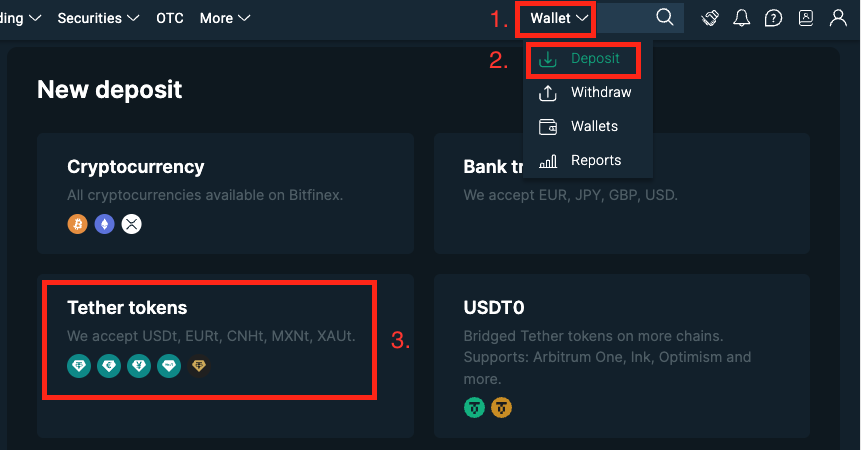
Transfer step 1
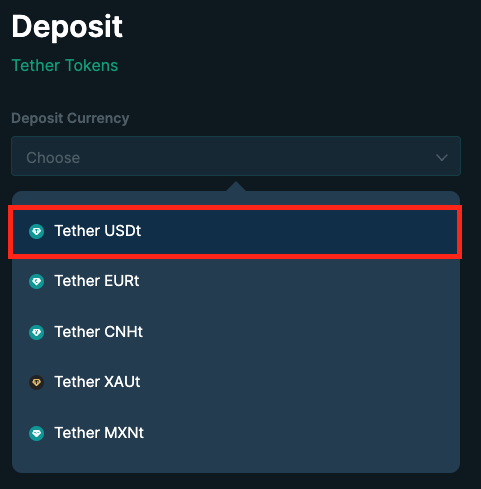
Step 2: Select Tether USDt
Transfer step 2
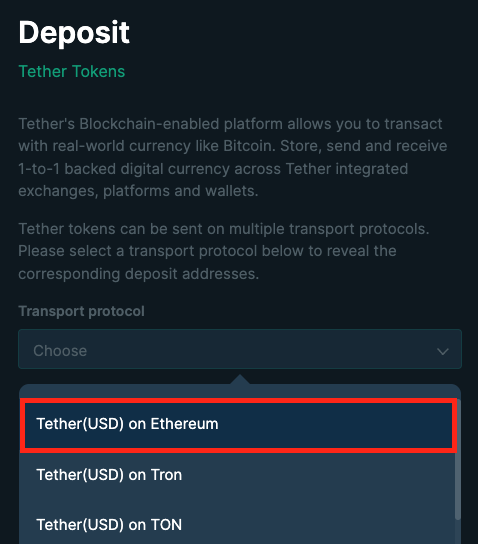
Step 3: Select Tether (USD) on Ethereum
Transfer step 3
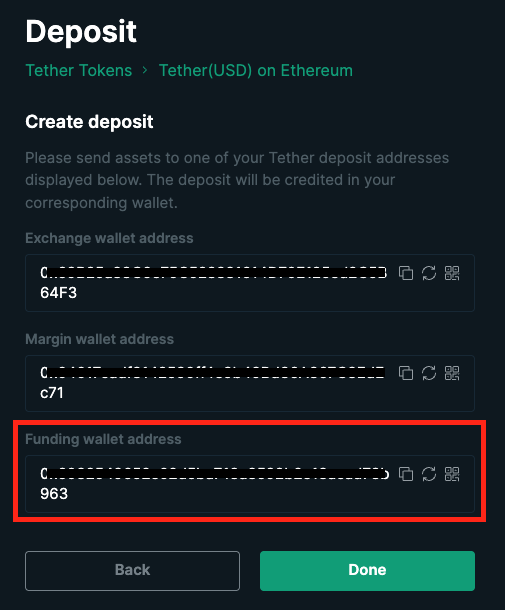
Step 4: Copy Funding Wallet Address
Transfer step 4
Step 5: Transfer to the Bitfinex Funding Wallet Address

Bitfinex will receive the USDT in about 10 minutes. You can check the funds in your Bitfinex wallet.

↑ Back to catalog

Newbie Guide

QHow do I start using the newbie guide?

After logging in, the system will automatically check your newbie-guide completion status. If not completed, you will be directed to the newbie-guide page.

QWhat steps do I need to complete?

The newbie guide includes the following steps:
  1. Bitfinex Registration
  2. Bitfinex Identity Verification (KYC)
  3. API Key Setup
  4. USDT Transfer to Bitfinex

QHow do I confirm if I've completed a step?

After completing each step, a checkmark (✓) will appear on the corresponding card. You can also click the "Complete" button to mark a step as done.

QWhat should I do if I encounter issues with API setup?

Please ensure you have correctly entered the API Key and API Secret, and have granted the necessary API permissions. If the issue persists, please check your internet connection or try again later.

QHow do I ensure my account security?

Please enable Google Two-Factor Authentication (2FA) and keep your API keys and password secure. Do not share these credentials with others.

QWhat should I do if I encounter issues when purchasing USDT?

Please confirm your MaiCoin account has passed identity verification and use your linked bank account for transfers. If the issue persists, please contact MaiCoin customer service.

QWhat are the benefits after completing the newbie guide?

After completing the newbie guide, you will receive one month of free lending-robot service and can start using other platform features.

↑ Back to catalog

Robot Usage

QHow do I confirm if my Bitfinex API permissions are correctly set?
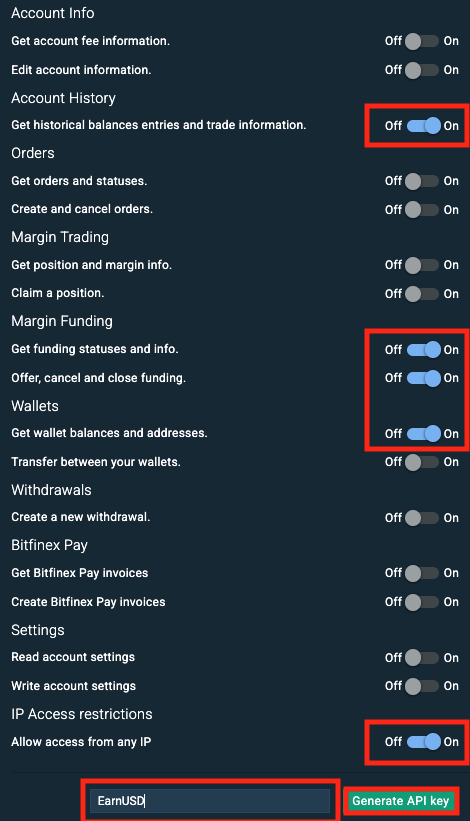
The system will automatically check your API permissions, including API key, secret key, verification level, and various read/write permissions. If any of these do not meet the requirements, you will be redirected to the account settings page.API permissions

QWhy am I redirected to the newbie guide or account page?

If you haven't completed the newbie guide or haven't subscribed to the service, the system will automatically redirect you to the appropriate page.

QWhy does it show "Insufficient idle funds (less than 151)"?

Please check in the Bitfinex APP that USD and USDT amounts are placed in the funding wallet to enable lending.

QHow do I view my cumulative earnings and investment days?

In the "Funding Wallet" card you can view your cumulative earnings and investment days. If there is no data, it will show "No data available".

QHow do I view recent interest income?

In the "Recent Interest" card you can view interest income from the last seven days. If there are no records, it will show "No recent income records".

QHow do I view and manage my lending orders?

In the "Active Lending Orders" and "Pending Orders" cards you can view your current lending and pending orders. When the robot is turned off, all pending orders will be cancelled.

QHow do I set up and manage the robot?

In the "Control Panel" you can turn the robot on or off. You can only set parameters like reserved amount, minimum interest rate, and stop date when the robot is turned off. You can also choose different lending strategies and interest-rate adjustments.

QHow do I enable Telegram earnings notifications?

You need to bind your Telegram account first. After turning off the robot, you can enable daily earnings notifications in the control panel. If the robot is not turned on, notifications will not be sent. Users who haven't bound Telegram need to log out first, then log in with Telegram, remembering to enter their original account email.

QHow do I place orders manually?

After turning off the robot, a "Manual Order" area will appear where you can input amount, annual interest rate, and duration to manually create lending orders.

Q2-day Strategy

When this strategy is selected, all lending orders will have a fixed duration of 2 days. This strategy is suitable for users who want to maintain liquidity and quickly adjust their investment strategy.

QHigh Interest Dynamic Duration Strategy
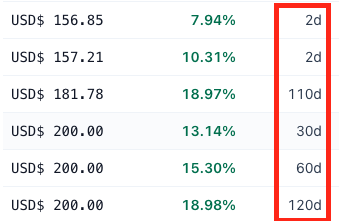
This strategy allows the system to dynamically adjust lending duration based on market interest rates. Users can set a maximum duration (e.g., 120 days), and the system will choose the optimal lending duration within this range to obtain higher interest returns.Dynamic duration

QInterest Rate Adjustment Tiers (only affects durations less than 30 days)

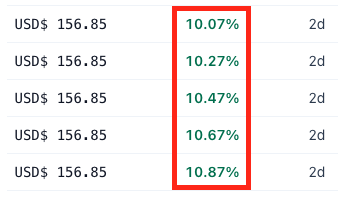
Users can choose different interest-rate adjustment tiers, which determine the rate increase between sibling orders. Higher tiers can yield higher returns when market rates rise, but may increase the risk of orders not being filled.
  • 0%: No interest-rate adjustment, all orders maintain the same rate.
  • 0.02%: Each order increases by 0.02%.
  • 0.2%: Each order increases by 0.2%.
  • 0.5%: Each order increases by 0.5%.
  • 1%: Each order increases by 1%.

QNumber of Orders per Batch

Maximum 20 orders per batch. If you want to quickly deploy all funds for your first lending, you can set the minimum order amount as total amount / 20. After all idle funds are deployed, you can then lower the minimum order amount.

QMinimum Interest Rate Limit

Manual: Set your own minimum interest rate; orders won't go below this rate. Dynamic: Adjusts based on market average, avoiding sudden low rates.

QLong Duration Reserve Orders (only fills orders over 30 days)

Prevents missing high-interest long-duration orders due to insufficient idle funds. Set at least 1 order to enable high-interest instant orders. Reserve orders will intelligently create multi-day orders, waiting for high interest. Dynamic duration has no effect if less than 30 days.

QLending Speed Strategy (only affects durations less than 30 days)

Divided into fast lending, balanced mode, and slow high-interest. Fast lending: immediately follows market-rate changes, fast filling. Slow high-interest: prioritizes higher rates, gradually decreases to market rate. Filling-speed difference is 5–30 min.

QAverage Distribution Strategy

Funds will be evenly distributed across each lending order. This means each order has the same amount — suitable for users who want to reduce risk and maintain balanced fund distribution.

QIncremental Pyramid Strategy

Order amount increases with higher interest rates. Orders with higher rates get more funds allocated. Suitable for users who want to earn higher returns when interest rates are high.Incremental pyramid

QReserved Amount

The reserved amount is the portion of funds that users choose not to participate in lending. These funds remain in the user's account and will not be used for automatic lending.

QRegular BTC Purchases

This feature requires enabling API permission for inter-wallet fund transfers and resetting API keys on the account page. The feature allows users to periodically transfer reserved idle funds to the trading wallet for BTC purchases — a regular-investment strategy. When enabled, the system transfers reserved idle funds to the trading wallet daily at 02:00 UTC (10:00 your local time).

Regular BTC purchase

QWhat are FRR orders?

FRR order rates change with market FRR rates, updating hourly. FRR rates rise and fall gradually.

QWhy are there no recent interest records for BTC?

Due to low daily interest rates and small BTC amounts, if daily interest is less than 0.00000001 it cannot be recorded. Estimated interest recording starts at 0.02 BTC.

QWhat is the cost of USDT and USD exchange?

One exchange costs about 0.25%, round trip costs about 0.5%. Try to avoid frequent short-term exchanges to prevent profits from being eaten by fees. You can use FRR rates to gauge market sentiment.

↑ Back to catalog

Subscription Plans

QHow is the lending amount limit calculated?

The total lending amount is the sum of USD and USDT. If it exceeds the lending-amount limit, the excess portion will not be automatically lent.

QHow can I make payments?

We use PAYUNi and BitfinexPay, providing payment via USDT, credit cards, UnionPay, Apple Pay, Google Pay, and Samsung Pay.

QWill invoices be provided?

We use electronic invoices. After your order is completed, an electronic invoice will be issued to your registered email address.

QHow do I check my order status?

You can check your order status in the subscription records under account management. If the order shows "Paid", it means the order has been successfully processed.

QWhich currencies can I use for lending?

You can use USD, USDT, and BTC for lending.

QWhat subscription plan options are available?

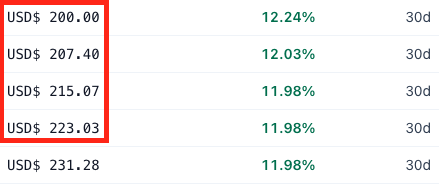
Subscription plans range from USD$ 5,000 to 1,000,000 in lending amount, and you can choose subscription periods from 1 to 12 months.

QHow do I apply a discount code?

If you have a discount code, you can enter and apply it on the subscription-plan page. Upon successful application, you will receive one month of free subscription. This is only valid for the first order and cannot be used with your own referral code.

QHow do I increase my lending limit and usage period?

The subscription fee is calculated based on your lending amount and subscription months, taking into account any applicable discounts. Unused order amounts will be automatically deducted.

QHow do I request a refund?

Please email service@earn-usd.com for refund requests. Refunds will be calculated based on the number of days the plan was used. Since a one-month trial period is provided, accounts that request refunds will no longer be eligible for related services in the future.

↑ Back to catalog

Account

QHow do I view my account information?

After logging in, you can view your account information on the account-management page, including email, subscription status, subscription period, and lending-amount limit.

QHow do I know my subscription status?

On the account-management page, you can see your subscription status. If it shows "Subscribed", your subscription is still active; if it shows "Expired", your subscription has expired.

QHow do I view my subscription period?

The subscription period is displayed in your account information. If you haven't subscribed yet, it will show "Not Subscribed".

QHow do I set up or update my Bitfinex account?

You can view or set up your Bitfinex account on the account-management page. If not set up, it will show "Not Set".

QHow do I bind my Telegram account?

If you haven't bound your Telegram account yet, you can click the "Settings" button to bind it. Remember to enter your original account email.

QHow do I view or update my API Key and API Secret?

In the Bitfinex API settings card, you can view or update your API Key and API Secret. Click the "Settings" button to enter edit mode, and click "Save" after updating.

QHow do I view my API permission status?

You can view the status of various API permissions in the API settings card — history, lending, wallet, etc.

QHow do I view my subscription records?

In the subscription-records card, you can view past subscription records, including lending-amount limit, start date, end date, order status, etc.

QHow do I view order details?

Click the "Details" button to view detailed information about the order.

QHow do I view my USD, USDT, BTC asset snapshots?

In the USD, USDT, BTC asset-snapshot cards, you can select a month to view past asset snapshots, including interest, annualized return, total assets, etc. If the BTC amount is too small, the system will not create a snapshot.

QHow do I view USD, USDT, BTC robot execution records?

In the USD, USDT, BTC robot-record cards, you can select each hour to view the robot's execution records, including execution time and results.

QWhy are there no BTC asset snapshot records?

Due to low daily interest rates and small BTC amounts, if the daily interest is less than 0.00000001 it cannot be recorded in the system. It is recommended to have at least 0.02 BTC for interest to be recorded.

QWhy is the actual interest rate lower than the expected rate?

Because Bitfinex charges a financing fee of 15% from the effective margin-financing interest.

↑ Back to catalog

Referrals

QHow do I get my referral link?

After logging in, you can find your unique referral link on the "Referral Rewards" page. You can share this link directly with friends, and you will receive a rebate when they register and pay for a subscription plan.

QHow do I earn referral rebates?

When someone registers using your referral link and pays for a subscription plan, you will receive a 10% USDT rebate.

QHow can I view my referral list?

In the "Referral List" card, you can view all users who registered using your referral code. The list shows registration time and partially masked email addresses.

QHow do I withdraw my referral bonus?

In the "Withdraw Bonus" card, you can check the withdrawable amount. You can apply for withdrawal when the amount exceeds USDT$ 10. Please ensure you have set up your Bitfinex USDT wallet address.

QHow do I set up or update my USDT wallet address?

In the "Withdraw Bonus" card, click the "Settings" button to edit your USDT wallet address. After completion, click "Save" to update the address.

QHow long does it take to process a withdrawal request?

Withdrawal requests typically take one week to process. Please be patient and ensure your wallet address is correct.

QHow can I view my rebate records?

In the "Rebate Records" card, you can view detailed information about all rebates, including order time, order number, referrer, referral amount, and status.

↑ Back to catalog